Quarterly records package
The requested material is attached. Please retain this message with the project record.
QEPS APPX Email Processing System
QEPS helps state archives and records teams turn mailboxes and message files into organized, searchable collections. Bring email in, appraise it, apply records policy, and prepare approved material for public access and long-term preservation.
EML MBOX PST ZIP & TAR Gmail metadata
The requested material is attached. Please retain this message with the project record.
01 Ingest the source
02 Find and appraise
03 Review with context
04 Publish the collection
What QEPS keeps together
Email is rarely tidy. QEPS gives archivists and records teams one place to appraise the message, its attachments, its history, and the decisions made along the way.
Load individual messages or large mailbox packages from a desktop, shared drive, removable storage, or server location.
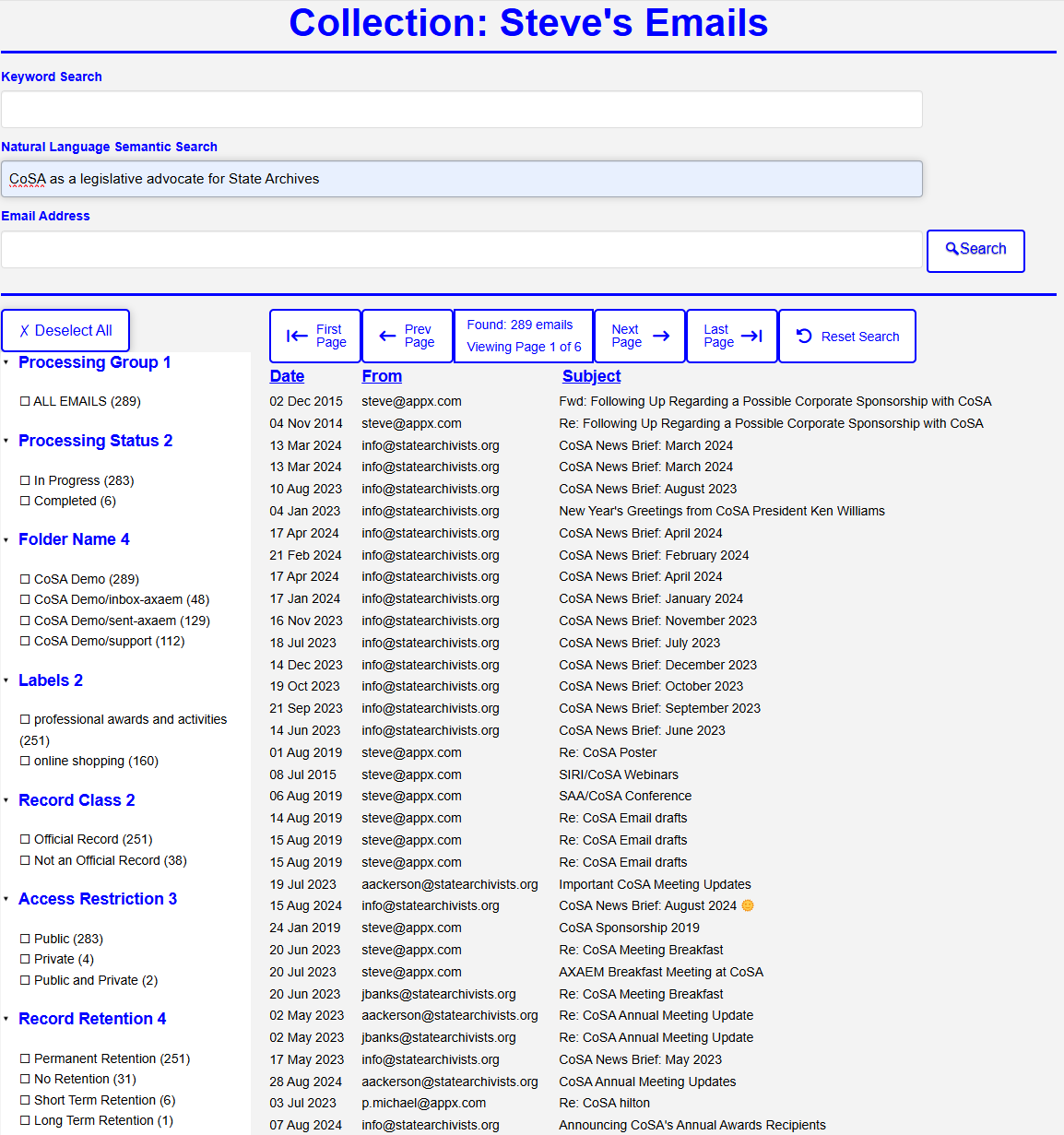
Search by keyword, date, sender, recipient, CC, BCC, or addresses found in the body. Move from a result to its thread, similar messages, headers, HTML view, or original file.
Use shared libraries for patterns, lexicons, addresses, domains, hyperlinks, and attachment types. Assign record classes, retention, access restrictions, labels, and redactions.
Review matches and suggested actions, accept or reject them, add notes and tasks, weed out irrelevant messages, and make manual changes when judgment matters.
Track processing status and review progress across a collection. Audit details, original-message access, and fixity results remain available when questions arise later.
A practical workflow
Each stage has a clear job. Teams can finish one archive, account, package, collection, or review group at a time—and see what still needs attention.
Select, transfer, unpack, uncompress, scan, save, and parse incoming email packages.
Build collections with groups, subgroups, members, processing groups, and reusable filters.
Examine content, attachments, addresses, domains, hyperlinks, patterns, and lexicons.
Work through pending decisions with the full message, its thread, its matches, and its assignments visible.
Mark finished collections ready, publish or unpublish them, and make approved material searchable.
Review without losing the message
Reviewers can move from a search result into a focused workspace that keeps the message, attachments, assignments, notes, tasks, and audit information together.
Thread view Follow the conversation around a message.
Similar email Find related or repeated material.
Original + HTML Compare the source with a readable view.
Manual redaction Mark and save sensitive passages.
Useful AI, kept close
QEPS uses a locally run semantic model to compare a plain-language search with the meaning of each message. A reviewer can look for an idea even when the email uses different wording.
The message text is processed inside the QEPS environment, whether QEPS runs on infrastructure you manage or in a hosted deployment. It does not have to be sent to a public AI service just to make the search work.
“Conversations about delaying the records transfer”
We will need to hold the package until the review is complete…
Please move the handoff to the next reporting period…
Different words. The same subject. Found without sending the collection away.
Part of the archival picture
QEPS is designed to work alongside AXAEM, APPX's archives and records-management solution. A QEPS collection can carry AXAEM references for its bibliographic record, agency, entity, and contact—so processed email can stay connected to its wider archival context.
Explore AXAEM ↗Controls built into the work
Apply access rules at the archive and message level, then review assignments before publishing.
Define retention levels and assign them through libraries, rules, or direct review.
Review redaction candidates, control the result, and create redacted access copies of email attachments.
Keep original-message access, fixity results, and recorded decisions close to the processed record.
Built in APPX
Run QEPS on infrastructure you control or in a hosted environment. Processing libraries can be reused across collections, then overridden where a collection needs different criteria or actions. Screens, fields, reports, integrations, and workflows can be tailored in APPX instead of forcing every organization into the same mold.
See it with your own questions in mind
The best way to understand the system is to walk through an ingest, a collection, and a review together. Ask about a demonstration or a trial run with representative material.
Prefer email? info@appx.com